
PopUp
Turning awkward gaps between classes into something worth doing.
00
Overview
Problem
Campus tools are built around big scheduled events or people you already know are nearby.
That leaves nothing for the small, unplanned gaps between classes, and it's off-campus, commuter, and first-year students who feel that gap the most.
Solution
PopUp turns a spare 30 minutes into a plan.
It generates a personalized activity based on time, location, and mood, so free time stops requiring a decision before it can become anything.
Effortless
Generate a Plan in Seconds
Tell PopUp how much time you have and what you're feeling up for. It'll suggest a few nearby ideas that actually fit the moment, with no endless scrolling required.
Shareable
Bring Someone Along
Found something good? Send it to a friend, like Finley, through the apps you already use. No new app is required for anyone else to tag along.
Personal
Keep Track of Your PopUps
See what you've tried, what's still active, and let PopUp learn your preferences over time, so every new set of ideas feels a little more like you.
01
Opportunity
Campus Context & Survey Research
College classes are fragmented across the day. A 30-minute break might technically be free time, but deciding where to go, what to do, and who to do it with can consume enough effort that doing nothing becomes the easiest option.
I started with a question:
How might reducing the effort of deciding what to do right now help students make better use of their free time?
Understanding the campus context
I mapped the stakeholders surrounding student life at Boston College and surveyed 20 students about how they spend unexpected free time, what keeps them from doing more with it, and how connected they feel to campus.
Stakeholder map: campus groups plotted by power and interest, with off-campus, commuter, first-year, and transfer students marked as primary users. Students needed to be the primary beneficiary, even if campus organizations and administrators could eventually become important stakeholders.
The barriers weren't distributed equally. Off-campus and commuter students, along with first-year and transfer students, faced some of the highest friction. Students described feeling outside the "BC bubble," lacking awareness of what was available, or simply being too tired to make another plan.
Designing for the students with the most friction
I prioritized these students as PopUp's primary audience. This gave me a clearer set of needs to design around without limiting the product's broader usefulness: reducing the effort required to make a spontaneous plan could benefit students across campus.
Students didn't necessarily need more options. They needed less friction between having free time and doing something with it.
The problem wasn't simply a lack of things to do. Students already had access to campus events, clubs, friends, and Boston itself. The friction came from turning all of those possibilities into a decision that fit the moment.
Where existing products fall short
I looked at two sides of the existing landscape: event platforms like Eventbrite and campus social products like Fizz.
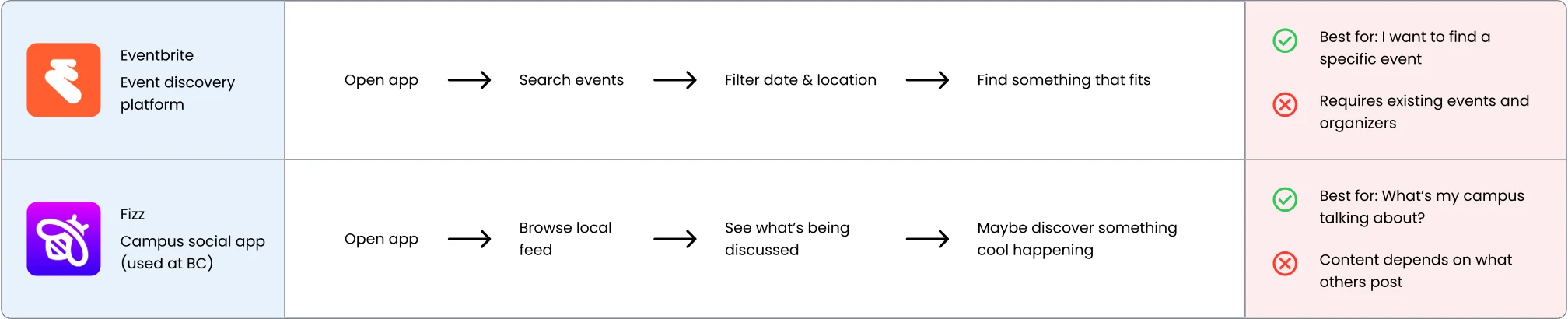
Eventbrite was useful for planning ahead. Fizz was useful for seeing what campus was talking about. Neither was designed around the smaller, more immediate question I kept seeing in the research:
"I have some time right now. What should I do?"
The opportunity wasn't another event feed. It was helping students create an option on demand.
02
Finding the Product
Ideation, Concept Scoring & Early Validation
Knowing the problem didn't immediately tell me what PopUp should be. I brainstormed across several directions before narrowing the ideas into three concepts that approached spontaneous free time differently.
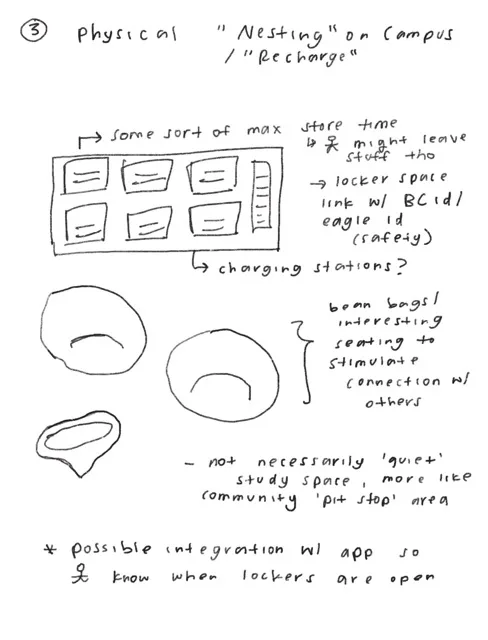
Physical rest network
Useful, but operationally heavy.
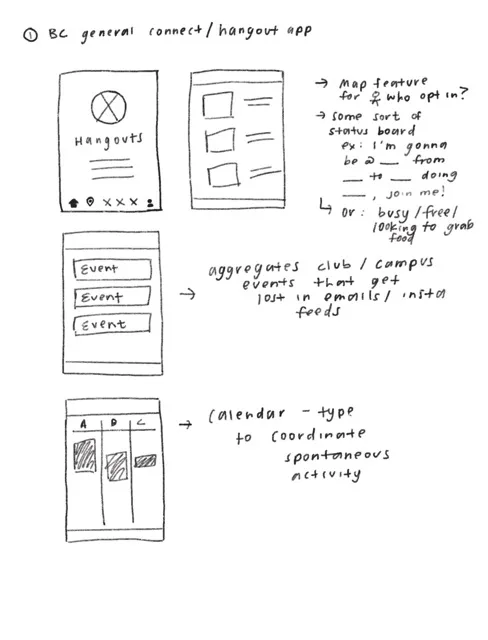
Campus connection platform
Broad potential, but dependent on network effects.
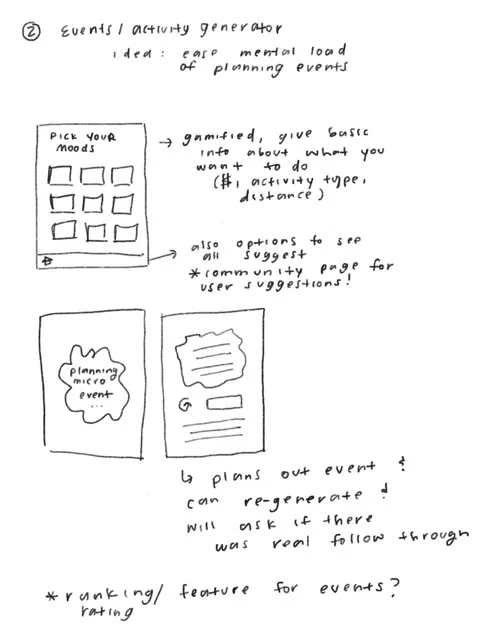
Micro-activity generator
Generate an activity based on the time and context a student has right now.
Choosing beyond intuition
Rather than choosing the concept I personally liked most, I scored the three directions against Fizz as a baseline using a weighted Pugh matrix. Reducing social isolation and lowering decision-making effort were weighted heaviest, followed by supporting spontaneous activity, then feasibility and encouraging repeat use.




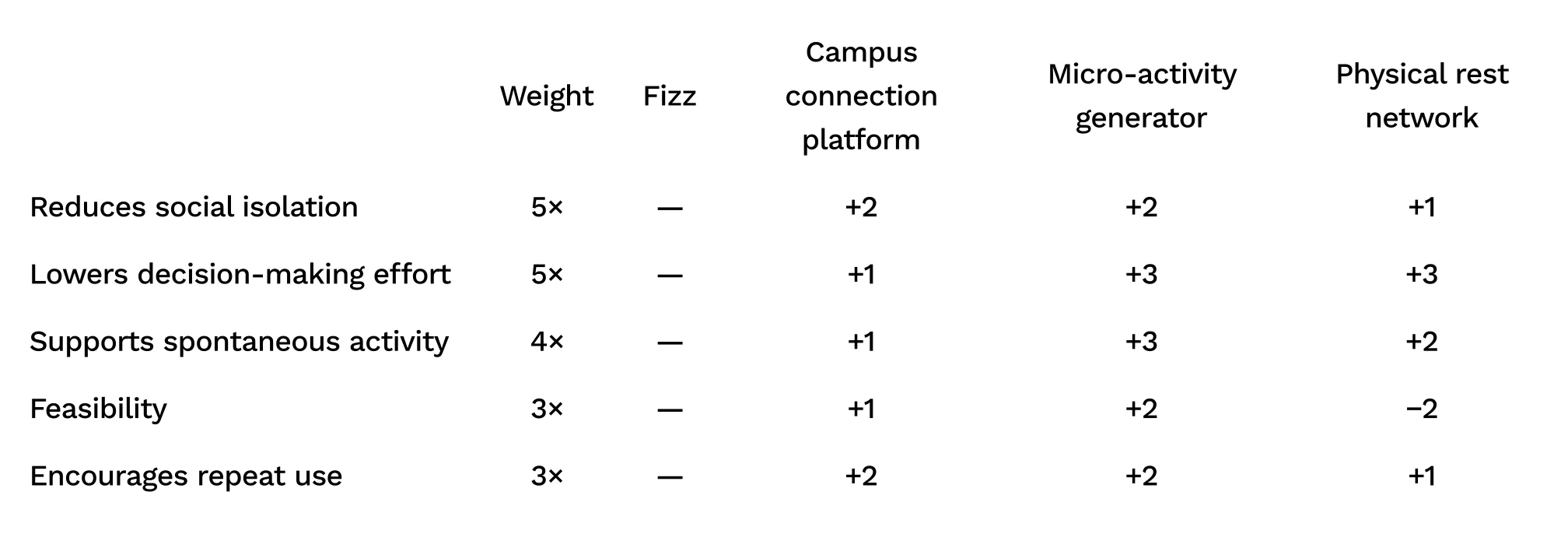
The micro-activity generator scored highest at 45, against 27 for the campus connection platform and 22 for the physical rest network, with Fizz as a 0 baseline. The generator emerged as the strongest direction because it attacked the problem most directly.
Students didn't need another place to browse for options. They needed help making the decision.
Turning the idea into something testable
I expanded the generator into a mid-fidelity prototype. At this point, PopUp was intentionally broad. Alongside generating an activity, I explored discovering what was happening around campus, inviting friends, joining other PopUps, sharing experiences, and seeing campus hotspots.
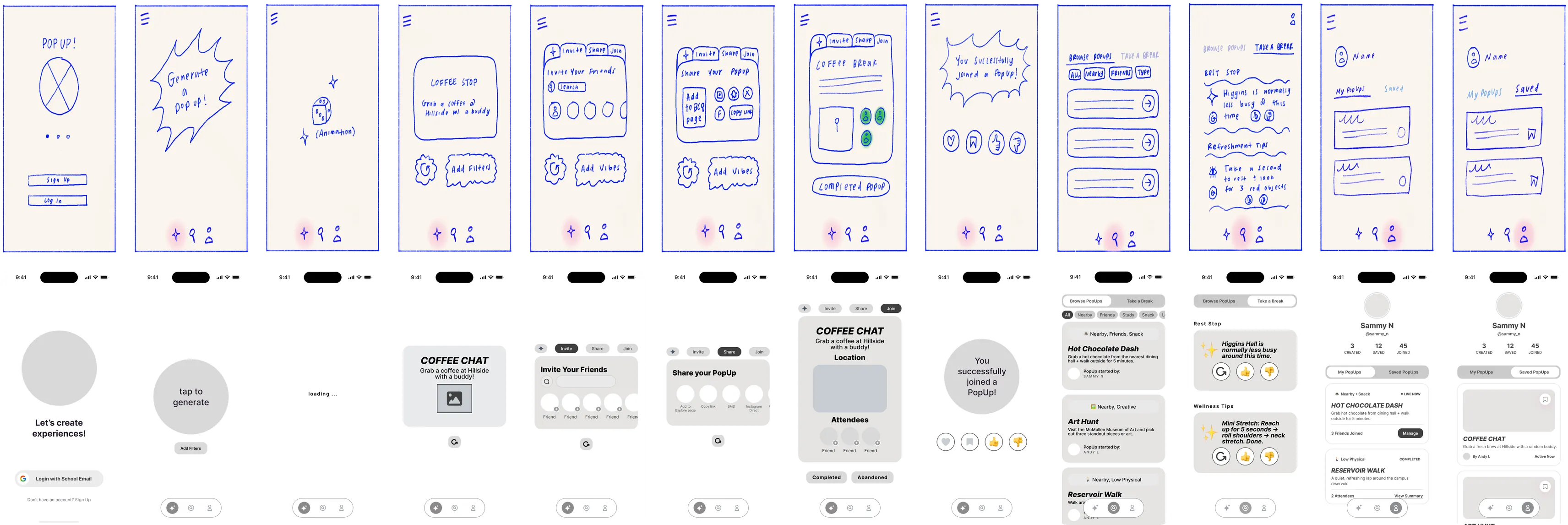
Before narrowing the product, I wanted to know whether the underlying idea was worth pursuing at all.
Validating the direction
I brought the mid-fidelity prototype into a focus group with 4 target users to understand whether PopUp addressed a real need, and which parts of the concept resonated.
The generator itself resonated. Participants liked receiving spontaneous ideas, but wanted enough control to make those recommendations relevant to their current situation.
Other features were less clear. The Take a Break feature, designed to surface campus hotspots and crowd levels, felt disconnected from the rest of the experience. Explore was appealing, but raised a different problem: it would only be useful if enough students and organizations were already contributing content.
What held up
Generated ideas felt useful and differentiated. Users liked randomness mixed with some control.
What didn't
Some secondary features lacked a clear connection to the core experience, while others depended on an active user network.
The overall product direction had been validated, but the test exposed a new problem: I was trying to make and test too many products at once.
03
Defining the MVP
Scoping MVP 1
Generation. Exploration. Campus hotspots. Invitations. Joining. Organizations. Social coordination. Each could add value to PopUp, but each also introduced another hypothesis that would need to be tested.
Instead of asking whether all of PopUp worked, I needed to isolate the smallest experience capable of testing its core value.
Personal utility before network utility
I split the roadmap into two layers.
MVP 1: Personal utility
Generate → Choose → Do → Learn
- Context-aware recommendations
- Save and share
- Active + completed PopUps
- Preference feedback
Later MVPs: Network utility
Explore · Official PopUps · Join · Organizations · User-created PopUps · In-app community
PopUp should be useful before PopUp is popular. That became the principle guiding MVP 1.
04
Designing the Core Loop
Usability Testing, MVP 1A → MVP 1B
Could one student get from "I'm free" to "let's do this" with as little friction as possible?
With the scope narrowed, I built MVP 1A around PopUp's personal utility loop and tested it in one-on-one sessions with 5 target users.

The core idea worked, but watching people use it revealed several places where the interface was creating exactly the kind of friction PopUp was supposed to remove.
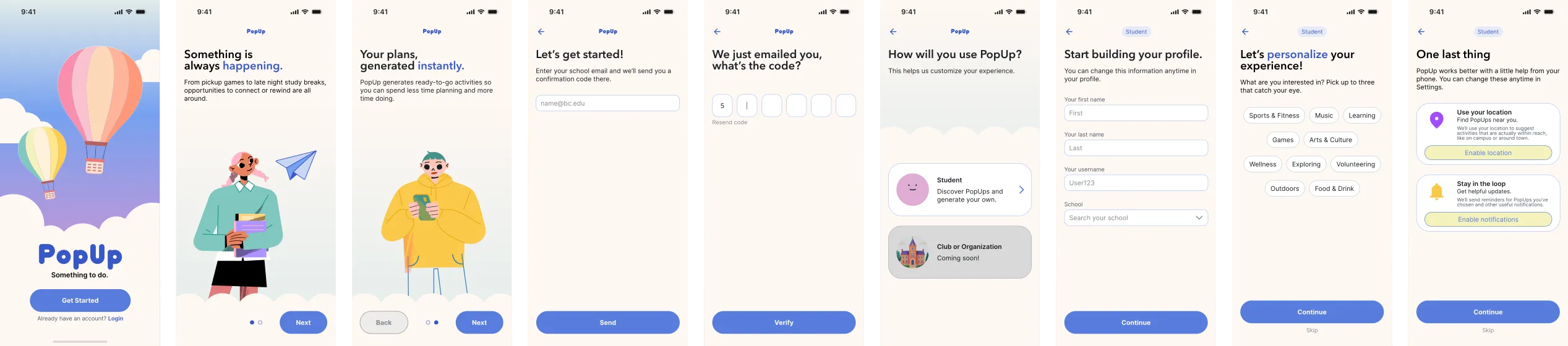
01. The product was learnable, but not immediately legible
Participants were able to learn the mechanics quickly and described the learning curve as comparable to other consumer apps. But several entered the experience unsure of exactly what PopUp did or how they should begin.
That initial uncertainty didn't prevent task completion, but for a product built around short moments of free time, I didn't want understanding the app to become another task.
MVP 1B
Redesign decision
Added a short onboarding sequence so students understand what PopUp does and how to start before they're asked to make their first choice, rather than figuring it out through trial and error.
02. The most important action didn't look actionable
The product's most important action looked like decoration, and a two-tab nav bar added structure it didn't need.
MVP 1A
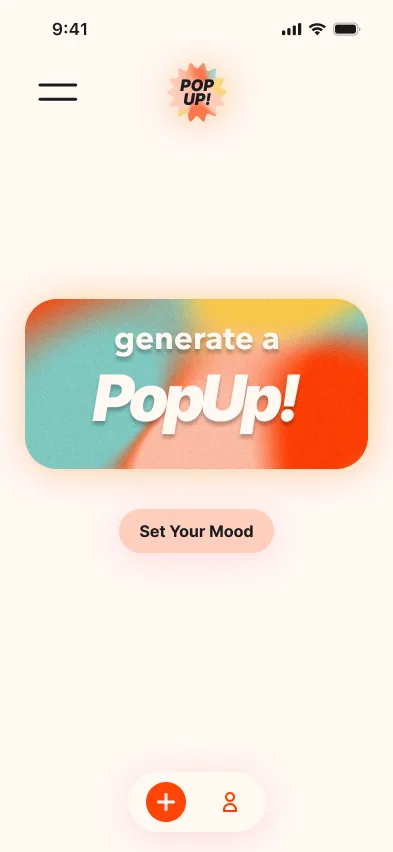
Confusing CTA button
Users thought the generate card was more decorative than functional.
A nav bar for two tabs
Generate and Profile were the only destinations.
MVP 1B
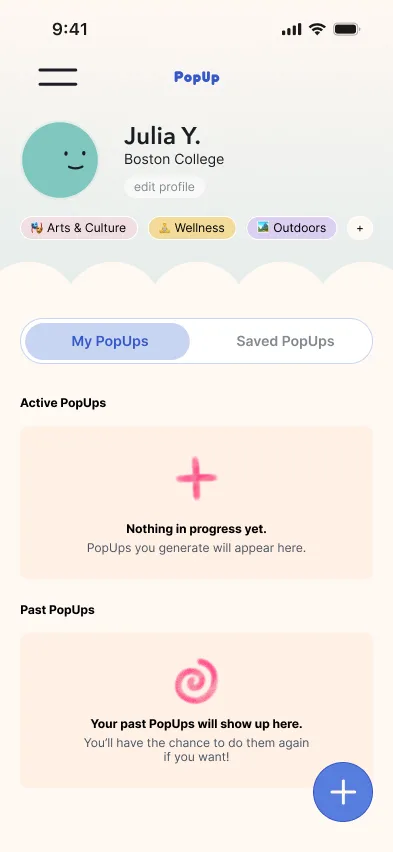
Generate became a floating button
Profile is now home. A floating button handles Generate, as in Fizz, which BC students already know.
03. "Optional" doesn't help if nobody knows it's optional
The issue wasn't only the number of steps, it was perceived effort. When someone only has 30 minutes to spare, even a minute of setup can feel like the planning PopUp is meant to remove. Invite and Share also pulled social coordination into the core flow before PopUp had proven it worked on its own.
MVP 1A
7 steps to publish
1Generate
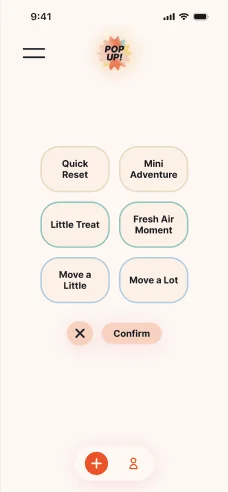
2Filters
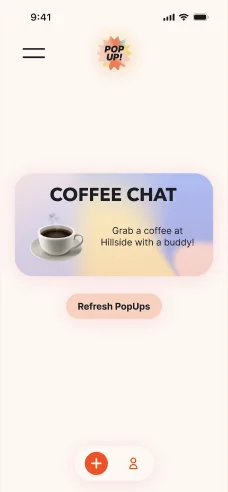
3Choose
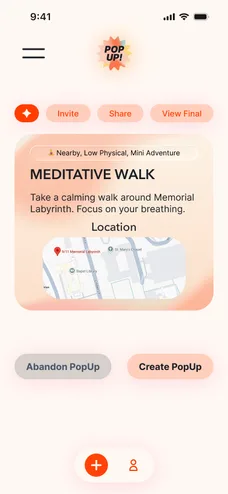
4PopUp
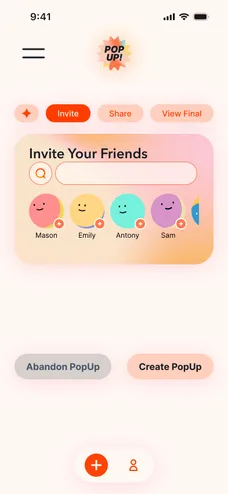
5Invite
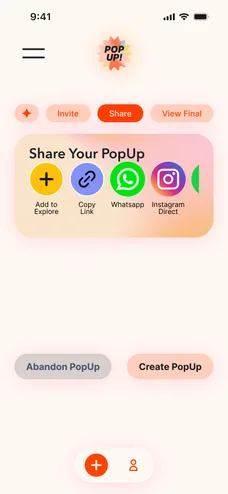
6Share
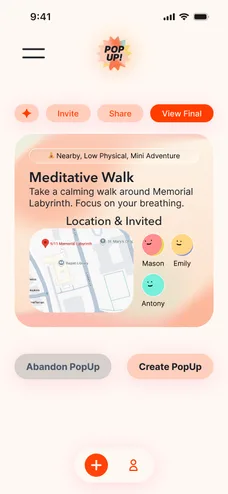
7Overview
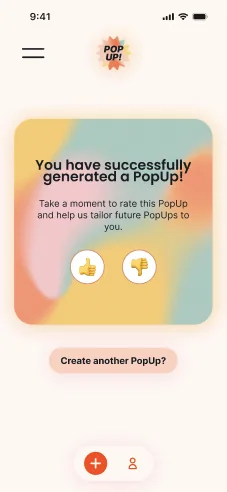
Created
Optional steps looked required
Users couldn’t tell Invite, Share, and Overview were skippable, and it wasn’t clear how Invite would work.
MVP 1B
4 steps to publish
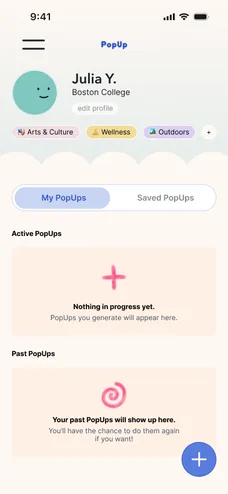
1Tap +
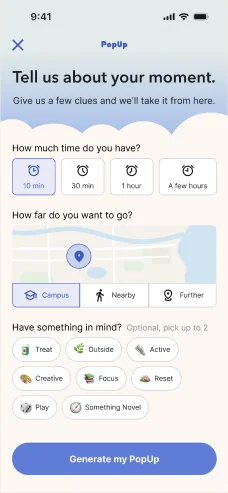
2Filters
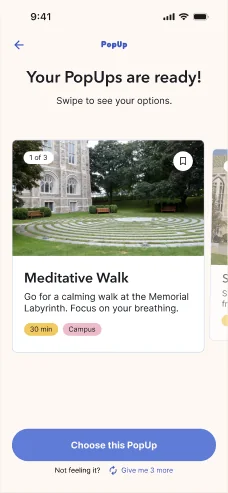
3Choose
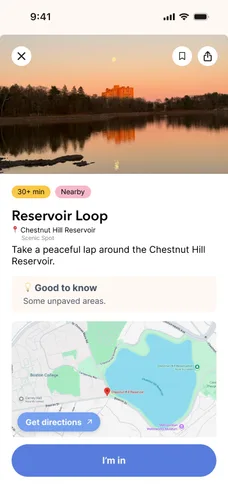
4Confirm
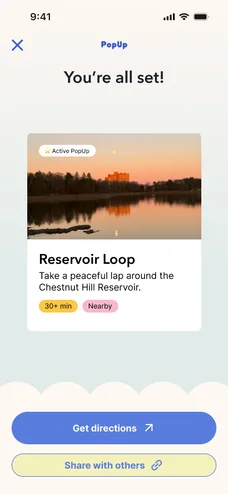
Created
Commit first, share after
Four steps to publish. Sharing is optional afterward, through the apps students already use.
04. Serendipity needed a layer of control
Early testing showed tension between the novelty of random generation and the frustration of getting an idea that didn't fit. Two changes added control without removing the surprise: better filters up front, and three options to choose from instead of one.
Filters
MVP 1A
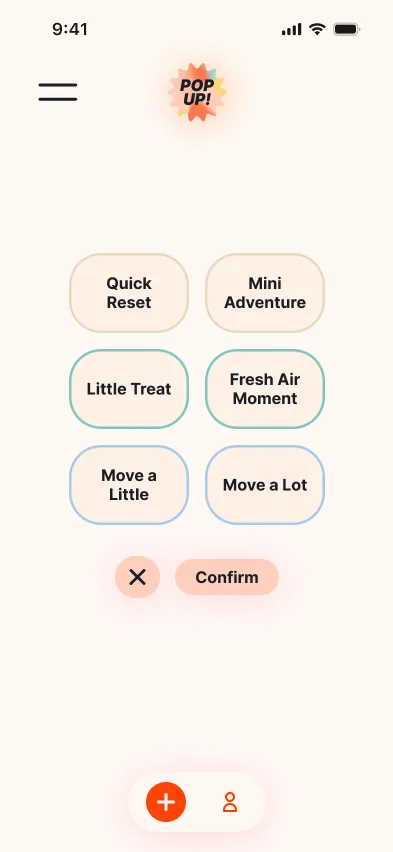
Filters didn’t steer results
Time, effort, and activity type were mixed into one list, so picks still felt random.
MVP 1B
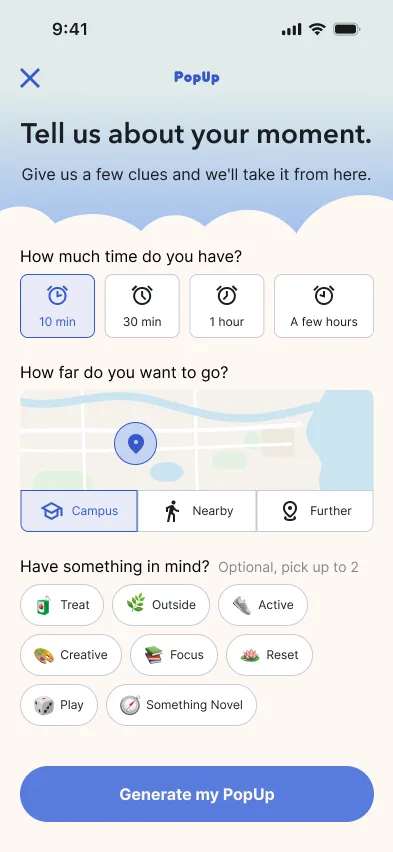
Purposeful filters
Time, distance, and interests each get a section, so users can steer the result. Interests stay optional.
Choices
MVP 1A
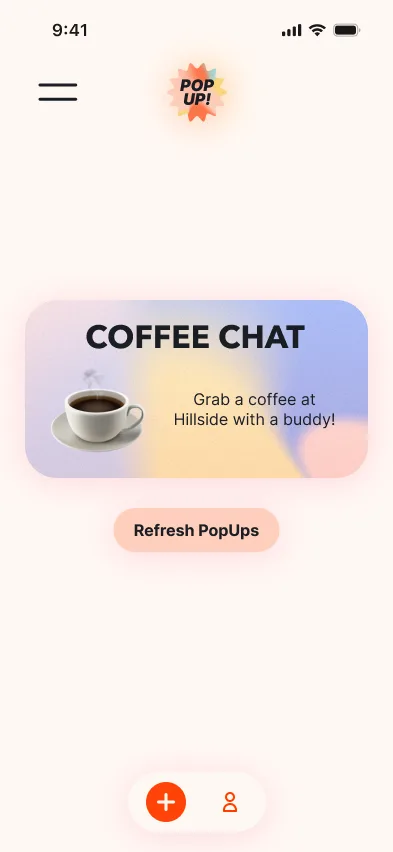
One option at a time
Pressing Refresh PopUps again and again made it feel like the app wasn’t working.
MVP 1B
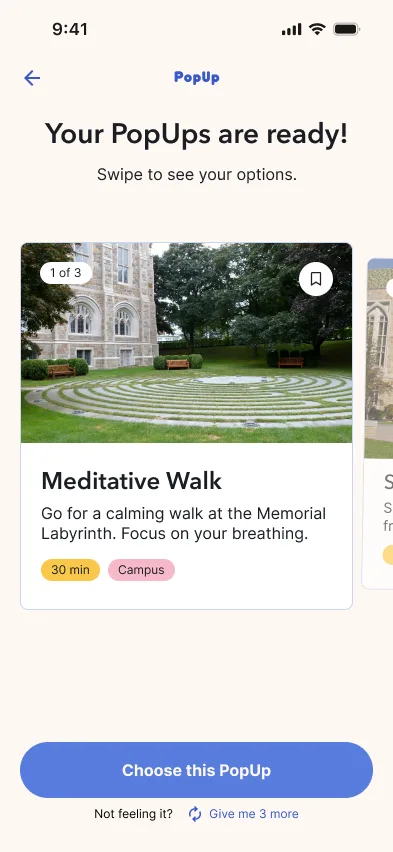
Three options
Just enough choice to find a fit, without being overwhelming.
05. The loop needed an ending
Once a user chooses a PopUp, what tells the product whether the recommendation was actually useful? Selecting an activity is a signal, but completing it is stronger evidence that the recommendation worked.
MVP 1A
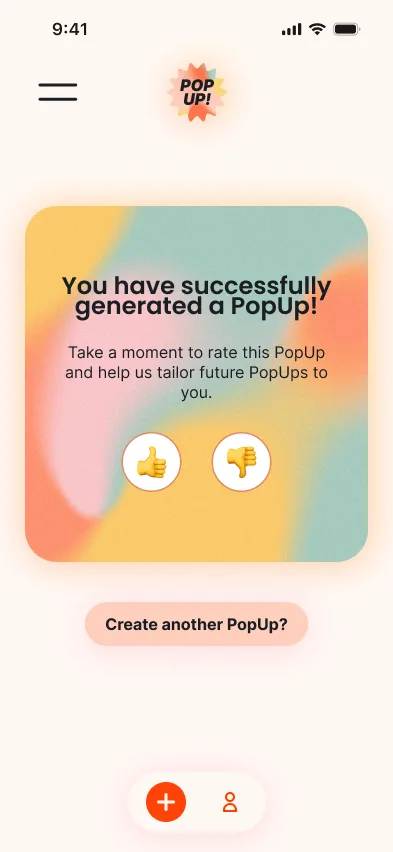
Feedback came too early
This screen comes up right after users create a PopUp and before they could actully complete it, leading to confusion on what exactly it was supposed to be rating.
MVP 1B
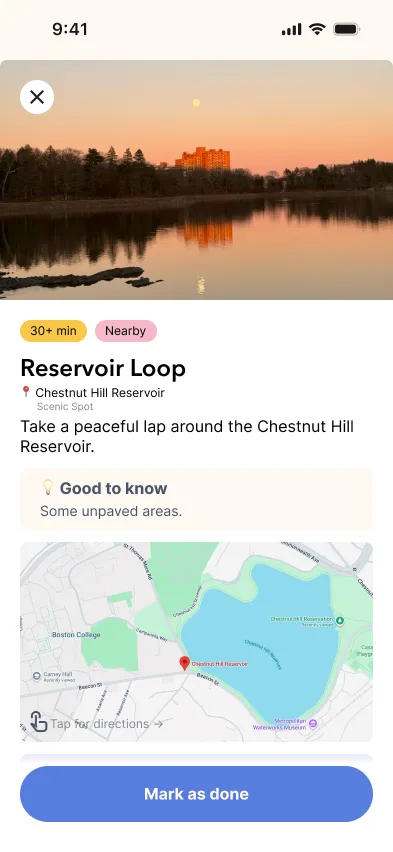
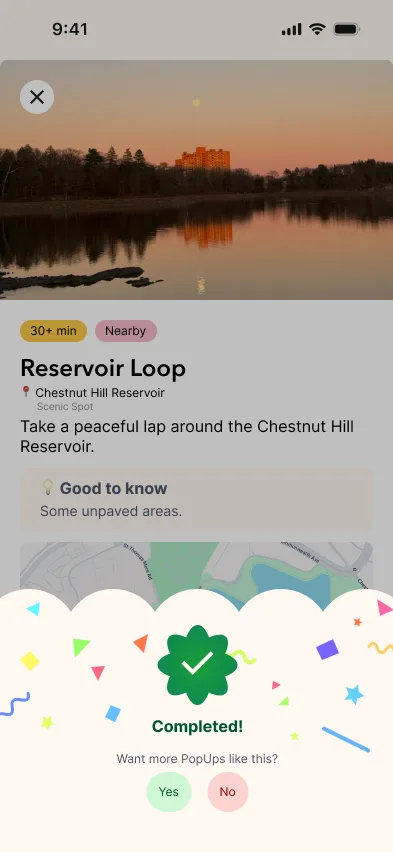
Feedback after completion
The feedback prompt appears only after a PopUp is marked complete.
Same product hypothesis. Less work for the user.
MVP 1B didn't add more capability to the core loop. It clarified the product, reduced unnecessary decisions, gave users more control over recommendations, and made committing to a PopUp more direct.
MVP 1A
Understand → Configure → Generate → Evaluate → Invite / Publish → Do
MVP 1B
Generate → Choose → Do → Learn
Giving PopUp an identity
MVP 1A's look was mostly default: bold gradients and a bright logo mark, more placeholder than identity. Once the core interaction survived testing, I explored what PopUp should feel like, from magic and blooming flowers to birds and hot-air balloons, and built it around open skies and hot-air balloons.
The metaphor gives PopUp movement and possibility without feeling like another productivity or event-planning app. A small design system keeps it consistent, from the wordmark and illustrations to buttons, cards, and feedback states, so personality can carry through onboarding, empty states, and moments of success without competing with the activities.
05
Final Prototype
06
Growing Beyond the MVP
What's Next
MVP 1 answers one question. It intentionally leaves others open.
The first MVP focuses on proving that PopUp can create personal utility: can one student open the app and turn an awkward pocket of free time into something worth doing?
If that behavior holds up, the next stage is testing whether participation from other students and organizations can make the experience more useful without reintroducing the complexity I removed.
Bringing discovery back
Explore was one of the more promising ideas from the first prototype, but it also introduced a supply problem. A future MVP could reintroduce Explore once PopUp has enough activity to make it consistently useful, combining student-created PopUps, organization-created activities, and official campus opportunities into a discovery layer built for what's happening now.
Students
"I want something to do."
PopUp
Organizations
"We have something happening."
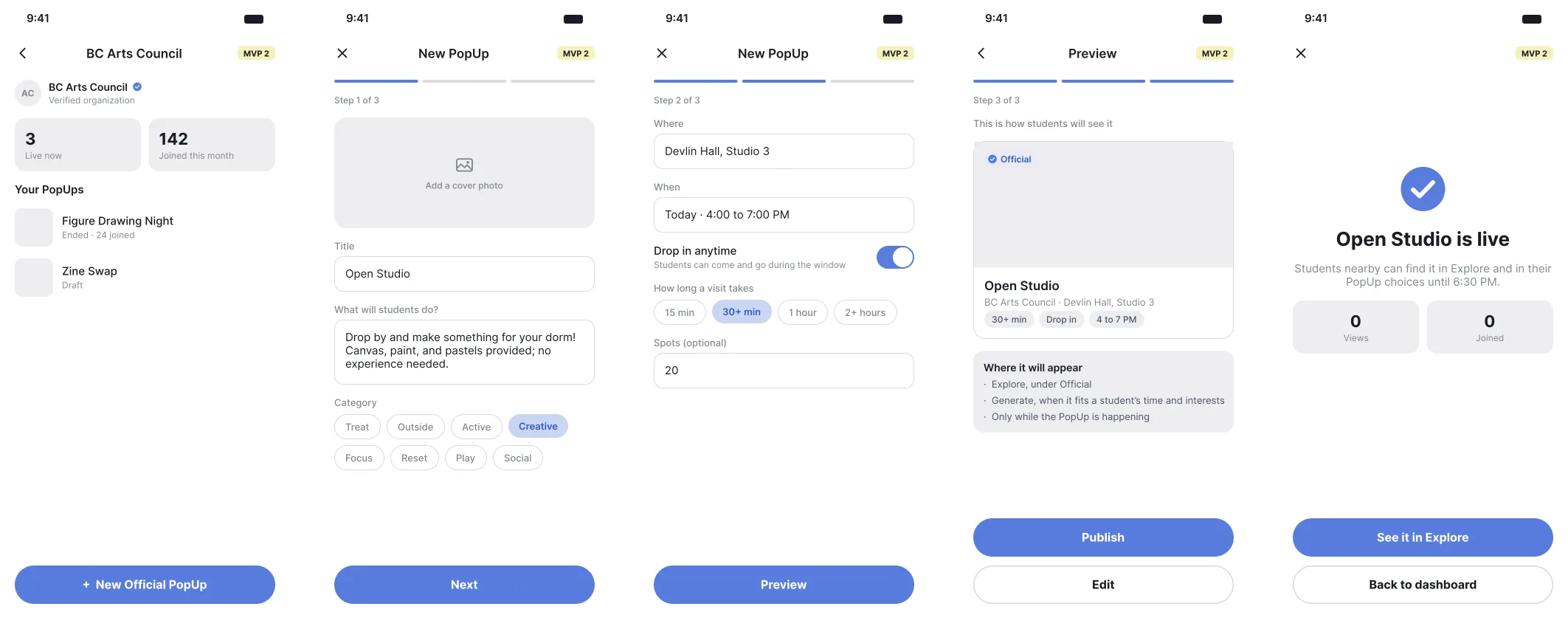
Verified organizations could publish lightweight opportunities that appear alongside places and things to do around campus and Boston.
Organization side
Create → Preview → Publish
Student side
Explore → Official PopUp → Join
Example: BC Arts Council publishes Open Studio → a student discovers Open Studio in Explore.
Making spontaneity social
Sharing currently happens through tools students already use, keeping MVP 1 independent of an existing PopUp network. A later MVP could test whether joining friends, creating public PopUps, and lightweight in-app communication make spontaneous activity easier, or simply turn PopUp into another social feed.
Where the product could go next
07
Reflection
What I'd Carry Forward
Scope before polish
I got excited and feature-happy early. The first prototype tried to prove generation, discovery, and social coordination all at once, so testing mostly taught me what to cut. Deciding the smallest thing worth testing had to come before any polish, not after.
Users wanted efficiency
Perceived effort counted as much as real effort: three skippable steps made a seven-step flow feel mandatory. Underneath every finding, my users wanted the same thing, to get from free time to a plan as efficiently as possible.